HOME
- - - - - Lazarus Tutorials TOC - - - - - -
Lazarus code for logging data into a SQLite table
SQLite: Lean, mean, free and excellent
Page URL: sl-log-data.htm
I've done quite a bit with several relational database managers.
And come away not entirely happy.
In September 2026, I came across SQLite for the first time, and... for the right jobs... it looks like a winner to me.
The link in the previous paragraph will take you to the project's home. It opens with the following text...
"SQLite is a C-language library that implements a small, fast, self-contained, high-reliability, full-featured, SQL database engine. SQLite is the most used database engine in the world. SQLite is built into all mobile phones and most computers and comes bundled inside countless other applications that people use every day."
Pretty impressive! And from my early experiments with it, I am inclined to believe all of that.
It is gloriously simple, clean, elegant.
Open source. Free. Multi-platform.qpIn a moment, I'll talk about a Lazarus program for adding records to a SQLite database.
First a little "getting started with SQLite" material. I hope you will see that installing it is simple and risk free.
For Windows, "installing" it is only a matter of creating a folder and putting some files from two downloaded .zips into it.
That gives you the basic SQLite "engine".
Although you can interact with it via a terminal program, or scripts, you'd be well advised to install the "DB Browser for SQLite". That gives you a GUI for using the database manager to create databases, specify the tables in your databases, specify the "columns" in the tables, and populate the "rows", (aka "fields" and "records"). You can get DB Browser for SQLite complied for various environments from sqlitebrowser.org/dl/. Under Windows, the website gives you an .msi, and launching that takes you through a simple install routine. (I'd encourage you to install both "flavors" of the browser. Both "DB Browser (SQLite)" and "DB Browser (SQLCipher)".
This is called SQLlite for a reason! It is not a replacement for, say the database manager supplied with Libre Office. but it will do things that I wanted to do... with only a small footprint.
What I wanted to do
I don't sleep very well.
Eventually, I'll make the system even fancier, but already I've set up a SQLite database to gather data about my nights.
I've put a laptop by my bedside, with a Lazarus program... the main subject of this webpage... running in it.
The Lazarus program has a number of large buttons.
I click one when I get into bed, and a record (row) is added to the database. Two fields (columns are filled: "Event", and "When". A code for "went to bed" goes in the event field, and the data and time of the event are entered when. (The timestamping is done within the database. The Lazarus program doesn't have o deal with that.
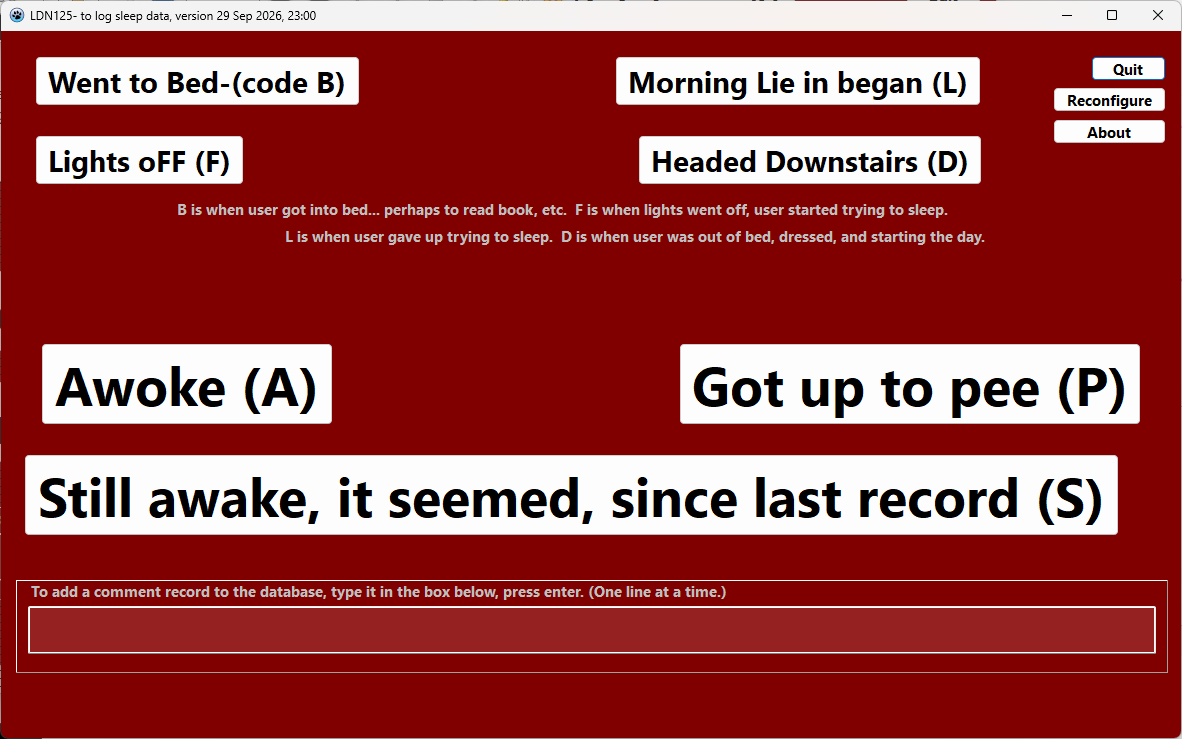
When I finish my bedtime reading, I click on a different button ("Lights off"), a different code goes in the record created.
If I awake in the night, there's a button to make a note of that event.
And so on.
Who cares?
I don't imagine many readers will want to log the events of sleepless nights... but I hope the code will be of interest. (At the end of this, you are invited to download the sourcecode.)
To play with the code, you'll need to set up a SQLite database. It can be very simple. You don't need the timestamp column. (A suitable SQLite database is supplied with the sourcecode, but of course you must install the SQLite engine on your PC before the file will be of any use to you.)
A SQLite database is entirely contained in just one file. The traditional extension is ".db". If you put the database in the same folder as the Lazarus .exe, you don't need to give the Lazarus program the path to it, just it's name. You can move it and/or rename it without rendering it useless.
You tell the Lazarus program the following via an .ini file. The .ini file must be in the same folder as the .exe, and it must be called LDN124ini.txt.
[Parameters]
LocationOfDB=LBC124-demo.db
NameOfTable=events
NameOfField=event
You can reconfigure the specifications in the .ini file with a button in the program. (The programming of that may be of interest, even if you don't want a program to add records to a database!)
The ini file is just a little text file. If you launch the program with no ini file present, one will be created... but you'll probably have to tweak the values in it. For the demo database supplied with the sourcecode, your ini file should look like...
I'll tell you how to fetch a zip with the whole project in a moment.
To send the records to a different database, change the LocationOfDB line.
If the database is in the same folder as the .exe, you only need to give the name of the database file.
If the database is elsewhere, just give the path and the name, e.g....
C:\Users\tkb\Documents\Databases\SQLite\\FirstSqliteDB.db
LEO, the AI a search.brave.com, was a great help to me, as I struggled to create this program. I'd ask questions like "How do I make a program with Lazarus to insert new records into a SQLite database?".
Coding details
One "trick" to writing something like the above from scratch is how you give your project the following objects...
- Conn: TSQLite3Connection;
- Query: TSQLQuery;
- Trans: TSQLTransaction;
Good news: What you need is already present in an ordinary Lazarus IDE installation! (I was using version 4.6, in September 2026, on a Windows 11 machine.)
You'll need SQLite3Conn and SQLDB in your uses clause... but I think the IDE puts them there when you put the objects on your form.
Go to the "SQLdb" tab of the components palette.
There's a dull blue feather there, which the pop-up tells us is for "TSQLite3Connection".
Put one on your form. (It is an "invisible" object... nothing will show on the form when the code runs. (Like the SaveDialog or Timer objects.)
Your code should now have...
SQLite3Connection1: TSQLite3Connection;
... in it. i wanted to change the names of the objects. Use the Object Inspector to change them, do not just edit the text in the .pas file.)
(It would work, if you didn't change the name... but you'd get tired of typing the IDE-generated name for the object.)
The rest of the code you'll have to learn about by studying the sourcecode!
Enjoy!
Sourcecode provided
You can download a .zip file (sl-log-data-code-and-db-ldn124.zip) with...
- A ready-to-run .exe
- The sourcecode for it
- A database to use with it ()
- LBC124-demo.db
As previously mentioned, you will have to set SQLite up on your system before the above will run. The set up has a small footprint. Details at sqlite.org.
Search across my sites with a Google search...
This searches wywtk, skywoof, sheepdogguides, sheepdogsoftware and arunet... but doesn't always give all of the pages that have content which matches the criterion.
Use the following to search THIS site.... (Go to my other sites, below, and use their search buttons if you want to search them.)
(Alas... my Lazarus material is split across two sites... SheepdogGuides.com and WYWTK.com. Sorry!)
Site Map
What's New
Search
This search engine is "old skool"- it merely looks for the words you type, so....
* Spell them properly.
* Don't bother with "How do I get rich?" That will merely return pages with "how", "do", "I"....
Please also note that I have four other sites, and that this search will not include them. They have their own search buttons.
My WhatYouWantToKnow site- https:/wywtk.com.
My Skywoof.com site.
My SheepdogSoftware.co.uk site.
https://www.arunet.co.uk/tkboyd/index2.htm: My ancient site at Arunet. (Some of the material there is dated, but there are useful pages about general principles which are timeless.) There's a section devoted to programming.
Link to Lazarus Tutorials main page
To email this page's editor, Tom Boyd....
Editor's email address. Suggestions welcomed! Please cite "sl-log-data.htm".
 Page has been tested for compliance with INDUSTRY (not MS-only) standards, using the free, publicly accessible validator at validator.w3.org. It passes in some important ways, but still needs work to fully meet HTML 5 expectations. (Copy your page's URL to your clipboard before clicking on the icon, so you can easily paste it into the validator when it has loaded.)-->
AND it has been tested with...

 Why is there a script or hidden graphic on this page? I have my web-traffic monitored for me by eXTReMe tracker. They offer a free tracker. If you want to try one, check out their site. Neither my webpages nor my programs incorporate spyware, but if the page has Google tools, they also involve scripts. Why do I mention the scripts? Be sure you know all you need to about spyware.
-- Page ends --