
Custom Search
Welcome! Looking for a challenge? Here you go...
Write a program that will put a pretty image of some spinning dots on the screen.
Make the outer dots spin more slowly than the inner dots.
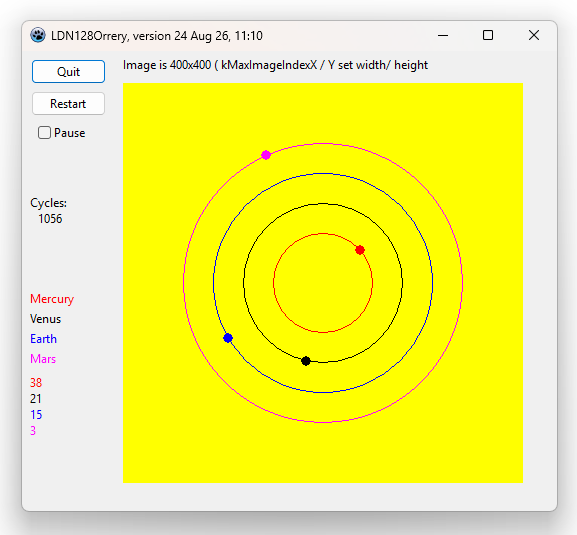
Set the speed of rotation with variables in an array. Something like..
 degChangePerIteration[0]:=13;
 degChangePerIteration[1]:=7;
 degChangePerIteration[2]:=5;
 degChangePerIteration[3]:=1;
Obviously, this program is going to use a loop. Those variables tell the code how many degrees around the circle a given dot should progress upon each iteration of the loop.
----
Actually, and I've only just realized this, they don't more exactly those angular distances on each iteration! But they sort of do! The dot associated with element [0] does move faster than the others, and [1] moves faster than [2], etc...
(In a moment I'll tell you how to get a copy of the program, so you can see it in action.)
But! The dots line up again at their starting positions from time to time... which wouldn't be surprising if the changes-per-iterations were something like 180, 90, 60, 45. But how can it happen with 13,7,5 and 1???
It's probably a rounding error problem.
But the display is still pretty, and still a worthy challenge!
It may well be to do with the fact that I try to do as much as possible with integer-type variables.
I am giving the sourcecode (and a ready-to-run .exe file) away free! (Details in a moment.) Dig into it! Fix my error!
While you're at it, change the entity that determines how fast the dots move. Use the time a given dot takes to complete 360 degrees.
And instead of just moving ahead "x" degrees in each iteration, re-calculate each time what bearing the dot should be on from where it started and how long a complete 360 degrees should take it. (That should "hide" the rounding errors that were accumulating disastrously in my "we'll go forward this much each time" version.
Click here to download a .zip file with the Lazarus sourcecode, and the .exe that it produces. After you've unzipped it, just double-clicking on the .exe will run it.
Lazarus: Free, open source, multi-platform. Give it a try! (The page you are reading is but one from my many pages of "How to code with Lazarus", with First Steps guides, and advanced topics, and many in between.)
Main page of the site where you can download the Lazarus IDE ("Integrated Development Environment")
Things will go more smoothly for you if you keep everything inside the "ldn128orrery" wrapper folder it came in.
A note about something I do...
Inside my code there are variables like "liYearsOrbX100[0]". If planet[0] completes its orbit in, say, 12.749 years, then I would store 1275 in liYearsOrbX100[0].
This allows me to use an integer variable for this parameter without sacrificing resolution.
I wrote my solution to this want using Lazarus. Lazarus has quite a nice built in procedure for drawing ellipses.
No "circle" procedure because a circle is of course just one sort of ellipse.
The Lazarus ellipse procedure must be supplied with the coordinates of the upper left and lower right corners of a box which would contain the ellipse. Fine. But not well suited to my wants.
So the first thing I did was to write my own procedure, one that would draw a circle from the coordinates of the center and the radius required. (Inside the code of the procedure I used the Lazarus ellipse procedure... But the headaches of that were now of no concern to me. I was getting circles the way I wanted to.
---
My code is incomplete in many ways. For instance, in due course I will make use of an ini file. They are considered "old fashioned" these days, and you don't see them as often as you once did. ("Config" files are a modern ini file under a new name. You sometimes see them!)
Even while writing the current ini-file-less version, I was looking ahead to the day when I would add an ini file. The things to be fetched from the ini file are carefully grouped together in the current code.
Let's say I want to change the value in the variable that controls the color of one of the spinning dots. At the moment, I have to edit the source code, and recompile the .exe.
That's the sort of thing that is easily put in the ini file.
The ini file can be a simple text file. Carefully formatted entries are put in the text file.
When the SpinningDots program starts, it goes to the exe file, finds the line which, in essense, says, "Make SpinningDot[2] blue", and the program fills the relevant variable with whatever it takes to achieve that.
You might want to try adding an ini file to the sourcecode, if you haven't played with ini files before. The may be old fashioned, but they are very useful.
(I have another tutorial that will help you with Using Ini Files.)
For many, MANY years I've wanted to create an orrery... a model of the planets moving around the sun.
That's what got me going on the program you see here. (The mention of "Mars", "Earth", etc might have been a hint.)
And I've nearly done it! As you can see!
Getting the spin rates right would be nice... and probably not terrible difficult.
Ah yes. "Not terrible difficult."
What if I said I also wanted to be able to put in a date/time and have a display that shows how the planets were then?
If that's too easy, too, I would also like the display to always have earth at the top of it's circle.
I would be very happy to mention successful completions of the challenge here. Contact details below. By all means, please feel free to use the contact details also to make suggestions, ask questions.
I hope schools will use this challenge with students studying programming.
Search across all my sites with the Google search...
Use this to search THIS site.... (Go to my other sites, below, and use their search buttons if you want to search them.)
(Alas... my Lazarus material is split across two sites... SheepdogGuides.com and WYWTK.com. Sorry!)
This search engine is "old skool"- it merely looks for the words you type, so....
* Spell them properly.
* Don't bother with "How do I get rich?" That will merely return pages with "how", "do", "I"....
Please also note that I have three other sites, and that this search will not include them. They have their own search buttons.
My WhatYouWantToKnow site- https:/wywtk.com.
My SheepdogSoftware.co.uk site.
http://www.arunet.co.uk/tkboyd/index2.htm: My site at Arunet. (Sorry.. not httpS accessible)
To email this page's editor, Tom Boyd.... Editor's email address. Suggestions welcomed! Please cite "lt8n-chall-spinning_dots.htm".
 Page has been tested for compliance with INDUSTRY (not MS-only) standards, using the free, publicly accessible validator at validator.w3.org. Mostly passes.
AND passes...

Click either icon to run its test. Be prepared to enter URL of page to be checked by hand when you reach the validation tool.
If this page causes a script to run, why? Because of things like Google panels, and the code for the search button. Why do I mention scripts? Be sure you know all you need to about spyware.
....... P a g e . . . E n d s .....